
藍鶯IM SDK:floo-web API介紹#
選型先讀#
藍鶯IM前端 Web SDK 共有三個版本,請按需選擇:
- Web版,主要供 PC 桌面瀏覽器使用,適合各種傳統前端應用程式;
- Uni-app版,基於 DCloud.io 的 uni-app 框架開發,供H5和各種小程式(微信/支付寶/百度/頭條/QQ/釘釘/淘寶),也可發佈到iOS、Android、快應用程式等平臺;
- 微信小程式版,符合微信小程式標準的原生版本,功能跟 uni-app 版完全一致;
以下文檔以 Web 版為例,所有版本基本一致。與此同時,DemoApp 源碼均已開放,建議直接參考開發。
前期準備#
1.下載對應 SDK 檔案,桌面 Web 版地址為:floo-3.0.0.js,並在程式碼中引用。
2.RTC功能需要在工程的package.json檔案的dependencies中增加webrtc-adapter和jquery以來。然後使用yarn或者npm安裝依賴包。
初始化#
首先設定 AppID
    const config = {
      // dnsServer: "https://dns.lanying.chat/v2/app_dns",
      appid: "YOUR_APP_ID",
      ws: false, // uniapp版需要設定為true, web版需要設定為false
      autoLogin: true
      };
然後建立im物件,供全局呼叫。
當前支持兩種方式:
- Script 方式,你可以直接 import 後,使用 window.flooIM()
    import "floo-3.0.0.js";

    const im = new window.flooIM(config);
這種方式主要為支持瀏覽器中使用 script 標籤引用,但會存在初始化併發問題,所以要用 try-catch-retry,請參見lanying-im-web源碼。
- module 方式,import flooim 後,使用 flooim()
    import flooim from 'floo-3.0.0';

    const im = flooim(config);
base 基礎部分#
登入
        im.login({
          mobile:String, #與name 2選1
          name:String,
          password:String,
        })
監聽
具體事件列表見本文檔的"事件通知"部分
        im.on('events', (ret) => {
          //do something with ret
        })
        // or
        im.on({
          eventName: (ret) => {
            //do something with ret
          },
          ...
        })
取消監聽
        im.off('events', (ret) => {
          //do something with ret
        })
        // or
        im.off({
          eventName: (ret) => {
            //do something with ret
          },
        ...
        })
二維碼登入
      im.qrlogin({
        password,
        user_id
      });
token登入
im.tokenLogin(user_id, token)
userManage#
使用者註冊
        userManage.asyncRegister({
          username,
          password
        }).then(() => {
          //
        });
取得登入使用者的token
const token = im.userManage.getToken();
取得登入使用者的uid
const cuid = im.userManage.getUid();
取得appid
const appid = im.userManage.getAppid();
取得最近回話列表
const list = im.userManage.getConversationList();
發送驗證碼
        im.userManage
        .asyncUserSendSms({
          mobile,
        })
        .then(() => {
          //
        });
發送驗證碼(通過圖片驗證碼)
        im.userManage
        .asyncCaptchaSms({
          captcha,
          image_id,
          mobile,
        })
        .then(() => {
          //
        });
檢查使用者名是否可用
        im.userManage.asyncUserNameCheck(username).then(() => {
          //
        });
綁定手機號-使用簽名綁定
        im.userManage.asyncUserMobileBindSign({
            mobile,
            sign,
          }).then(() => {
            //
          });
手機號驗證碼登入
        im.userManage.asyncUserMobileLogin({
          captcha,
          mobile
        })
        .then(res => {
          //
        });
更新手機號
        im.userManage
        .asyncUpdateMobile({ mobile })
        .then(() => {
          //
        });
更新頭像
        im.userManage
        .asyncUpdateAvatar({
          avatar
        })
        .then(() => {
          //
        });
更新暱稱
        im.userManage.asyncUpdateNickName({ nick_name }).then(() => {
          //
        });
取得使用者profile
        im.userManage.asyncGetProfile(true).then(res => {
          //
        })
更新使用者profile
        im.userManage.asyncUpdateProfile({
          username,
          avatar
        }).then(res => {
          //
        })
取得使用者設定信息
        im.userManage.asyncGetSettings().then(res => {
          //
        })
修改使用者設定
        im.userManage
        .asyncUpdateSettings({
          "auth_answer": "string",
          "auth_mode": 0,
          "auth_question": "string",
          "auto_download": true,
          "group_confirm": true,
          "id": 0,
          "no_push": true,
          "no_push_detail": true,
          "no_push_end_hour": 0,
          "no_push_start_hour": 0,
          "no_sounds": true,
          "push_nick_name": "string",
          "user_id",
          "vibratory": true
        }).then(() => {
          //
        });
rosterManage#
取得好友id列表
        im.rosterManage.asyncGetRosterIdList().then(res => {
          //
        });
取得好友信息
        im.rosterManage.asyncGetRosterInfo(state.sid).then(res => {
          //
        })
根據id列表取得使用者詳細信息
        im.rosterManage.asnycGetRosterListDetailByIds(rosterIdList).then(res => {
          //
        });
根據id取得聊天信息
const rosterMessages = im.rosterManage.getRosterMessageByRid(uid);
讀取訊息
im.rosterManage.readRosterMessage(uid);
刪除好友
        im.rosterManage
        .asyncDeleteRoster({ user_id})
        .then(() => {
          alert("好友已刪除");
        });
取得緩存的所有新使用者
const userMaps = im.rosterManage.getAllRosterDetail();
撤回訊息,只能撤回5分鐘內的
im.rosterManage.recallMessage(user_id, message_id);
刪除訊息
im.rosterManage.deleteMessage(user_id, message_id);
取得使用者的未讀數
const unreadCount = im.rosterManage.getUnreadCount(user_id) :
設定訊息成未讀
im.rosterManage.unreadMessage(user_id, message_id);
取得好友信息
const roserInfo = im.rosterManage.getRosterInfo(user_id);
取得好友申請列表
        im.rosterManage
        .asyncGetApplyList({ cursor: "" })
        .then((res = []) => {
          //
        });
取得黑名單
        im.rosterManage
        .asyncGetBlockedlist()
        .then((res = []) => {
          //
        });
加入黑名單
        im.rosterManage
        .asyncBlockeAdd(user_id)
        .then((res = []) => {
          //
        });
移除黑名單
        im.rosterManage
        .asyncBlockeRemove(user_id)
        .then((res = []) => {
          //
        });
請求加為好友
        im.rosterManage
        .asyncApply({ user_id, alias })
        .then((res = []) => {
          //
        });
通過好友申請
        im.rosterManage
        .asyncAccept({ user_id })
        .then((res = []) => {
          //
        });
拒絕好友申請
        im.rosterManage
        .asyncDecline({ user_id })
        .then((res = []) => {
          //
        });
按名稱搜索使用者
        im.rosterManage
        .asyncSearchRosterByName({ username })
        .then((res = []) => {
          //
        });
按ID搜索使用者
        im.rosterManage
        .asyncSearchRosterById({ user_id })
        .then((res = []) => {
          //
        });
groupManage#
取得群信息
        im.groupManage.asyncGetGroupInfo(group_id, fromServer).then(res => {
          //
        })
取得加入的群組
        im.groupManage.asyncGetJoinedGroups().then(res => {
          //
        });
打開群組
        // 此方法會準備群組聊天界面的一些必備信息。
        im.groupManage.openGroup(group_id);
取得緩存的所有群組詳情
const allGroupMap = im.groupManage.getAllGroupDetail();
取得群組成員(異步)
        im.groupManage.asyncGetGroupMembers(group_id, fromServer).then(res => {
          //
        });
取得群組成員(同步)
const members = im.groupManage.getGroupMembers(group_id);
按id取得群組詳情
        im.groupManage.asyncGetGroupListDetail(groupIds).then(res => {
          //
        });
取得群訊息
const groupMessages = rootState.im.groupManage.getGruopMessage(group_id);
將群訊息設定已讀
im.groupManage.readGroupMessage(group_id)
撤回訊息
im.groupManage.recallMessage(group_id, message_id)
取得群未讀訊息數
const unreadCount = im.groupManage.getUnreadCount(group_id);
取得群管理員列表
        im.groupManage.asyncGetAdminList({ group_id }).then(res => {
          //
        })
群添加管理員
        im.groupManage.asyncAdminAdd({
          group_id,
          user_list
        })
        .then(() => {
          //
        });
移除管理員
        im.groupManage.asyncAdminRemove({ group_id, user_list }).then(() => {
          //
        });
取得群公告詳情
        im.groupManage.asyncGetAnouncementById( {announcement_id, group_id} ).then(res => {
          //
        });
刪除群公告
        im.groupManage
        .asyncAnouncementDelete({ group_id, announcement_id })
        .then(() => {
          //
        });
添加群公告
        im.groupManage.asyncAnnouncementEdit({ title, content, group_id })
        .then(() => {
          //
        });
群公告列表
        im.groupManage.asyncGetAnnouncementList({ group_id }).then((res = []) => {
          //
        });
建立群組
        im.groupManage.asyncCreate({
          name,
          type,
          avatar,
          description,
          user_list,
        })
        .then(() => {
          //
        });
解散群組
        im.groupManage.asyncDestroy({ group_id })
        .then(() => {
          alert("您已解散了此群。。");
        });
取得群組詳情
        im.groupManage.asyncGetInfo({ group_id }).then(res => {
          //
        });
更新群頭像
        im.groupManage.asyncUpdateAvatar({
          group_id,
          value,
        })
        .then(() => {
          alert("更新頭像完成");
        });
更新群描述
        im.groupManage.asyncUpdateDescription({
          group_id,
          value
        })
        .then(() => {
          //
        });
更新群名稱
        im.groupManage.asyncUpdateName({
          group_id,
          value
        })
        .then(() => {
          //
        });
取得群成員
        im.groupManage.asyncGetMemberList(group_id, fromServer).then(res => {
          //
        });
設定群訊息免打擾情況
        im.groupManage.asyncGroupMsgMutemode({
          group_id,
          msg_mute_mode
        })
        .then(() => {
          this.groupInfo.msg_mute_mode = this.groupInfo.msg_mute_mode ? 0 : 2;
        });
取得群黑名單
        im.groupManage.asyncGroupBannedList({ group_id }).then(res => {
          //
        });
禁言群成員
        im.groupManage.asyncGroupBab({ group_id, duration, user_list }).then(() => {
          //
        });
解除成員
        im.groupManage.asyncGroupUnban({ group_id, user_list }).then(() => {
          //
        });
設定群成員是否可以邀請
        im.groupManage.asyncUpdateAllowMemberInvitation({
          group_id,
          value
        })
        .then(() => {
          //
        });
設定群成員是否可以修改群信息
        im.groupManage.asyncUpdateAllowMemberModify({
          group_id,
          value
        })
        .then(() => {
          //
        });
設定群是否開啟已讀模式
        im.groupManage.asyncUpdateEnableReadack({
          group_id,
          value
        })
        .then(() => {
          //
        });
設定群歷史是否可見
        im.groupManage.asyncUpdateHistoryVisible({
          group_id,
          value
        })
        .then(() => {
          //
        });
設定入群是否需要申請
        im.groupManage.asyncUpdateRequireadminapproval({
          group_id,
          apply_approval
        })
        .then(() => {
          //
        });
更換群主
        im.groupManage.asyncOwnerTransfer({
          group_id,
          new_owner
        })
        .then(() => {
          //
        });
申請加入群
        im.groupManage.asyncApply({ group_id, reason })
        .then(() => {
          //
        });
同意/拒絕申請使用者加入群
        im.groupManage.asyncApplyHandle({
          approval: true/false,
          user_id,
          group_id
        }).then(() => {
          //
        });
取得群黑名單
        im.groupManage.asyncGroupBockedlist({ group_id }).then(res => {
          //
        });
將成員加入黑名單
        im.groupManage.asyncGroupBlock({ group_id, user_list }).then(() => {
          //
        });
解除黑名單
        im.groupManage.asyncGroupUnblock({ group_id, user_list })
        .then(() => {
          //
        });
踢出群組
        im.groupManage.asyncKick({ group_id, user_list }).then(() => {
          //
        });
取得群邀請列表
        this.im.groupManage.asyncGetInvitationList().then(res => {
          //
        });
邀請成員加入群
        im.groupManage.asyncInvite({ group_id, user_list }).then(() => {
          /
        });
同意/拒絕群邀請
        im.groupManage.asyncInviteHandle({
          approval: true,
          user_id,
          group_id
        }).then(() => {
          //
        });
退出群
        im.groupManage.asyncLeave({ group_id })
        .then(() => {
          //
        });
修改群名片
        im.groupManage.asyncUpdateDisplayName({
          group_id,
          value
        })
        .then(() => {
          //
        });
取得群申請列表
        im.groupManage.asncGetApplicationList({ group_list }).then(rs => {
          //
        });
取得群檔案
        im.groupManage.asyncGetFileList({ group_id }).then((res = []) => {
          //
        });
刪除群檔案
        im.groupManage.asyncFileDelete({ file_list, group_id }).then(() => {
          //
        });
sysManage#
發送好友訊息
        im.sysManage.sendRosterMessage({
          type,
          uid,
          content,
          attachment
        });
發送群訊息
        im.sysManage.sendGroupMessage({
          type,
          gid,
          content,
          attachment
        });
群發送@訊息
        im.sysManage.sendMentionMessage({
          gid,
          txt,
          mentionAll,
          mentionList,
          mentionedMessage,
          pushMessage,
          senderNickname
        });
發送輸入狀態訊息
im.sysManage.sendInputStatusMessage(roster_id, "nothing"/"typing");
轉發訊息
        im.sysManage.forwardMessage({
          uid,
          gid, //2選1
          mid,
        });
請求歷史訊息
        im.sysManage.requireHistoryMessage(roster_id/group_id, mid, amount);
        // mid:訊息ID, 從哪條訊息往前取歷史,0表示最新一條訊息。 amount:最多取多少條訊息。
取得所有訊息未讀狀態
const allAcks = im.sysManage.getAllMessageStatus() || {};
取得群檔案上傳url
        im.sysManage.asyncGetGroupAvatarUploadUrl({
          group_id,
          "access-token"
        })
        .then(res => {
          //
        });
取得聊天檔案上傳地址
        im.sysManage.asyncGetFileUploadChatFileUrl({
          file_type,
          to_id,
          to_type
        })
        .then(res => {
          //
        });
上傳檔案
        im.sysManage.asyncFileUpload({
          file,
          fileType,
          to_id,
          toType: "chat",
          chatType: "roster"
        })
        .then(res => {
          //
        })
拼裝圖片路徑
const image = im.sysManage.getImage({ avatar, type='roster', thumbnail=true });
rtcManager#
發起音視訊呼叫
        im.rtcManage.initRTCEngine({
          server,
          id,
          name,
          receiver,
          caller,
          callId,
          secret,
          pin,
          hasVideo,
          hasAudio,
          remoteAudio,
          getThrough,
          hangupCall
        });
銷燬音視訊環境
im.rtcManage.destroy();發送RTC訊息
        im.rtcManage.sendRTCMessage({
          uid,
          content,
          config,
          ext
        });
加入音視訊房間
        im.rtcManage.joinRoom({
          server,
          id,
          roomId,
          caller,
          pin,
          hasVideo,
          hasAudio,
          remoteAudio,
          getThrough,
          hangupCall
        });
離開音視訊房間
im.rtcManage.leaveRoom();發佈音視訊流
        im.rtcManage.publish({
          type,
          hasVideo,
          hasAudio,
          width,
          height
        });
取消發佈音視訊流
im.rtcManage.unPublish();訂閱音視訊流
im.rtcManage.subscribe(sources);取消訂閱音視訊流
im.rtcManage.unSubscribe(id);切換本地音訊流禁言狀態
im.rtcManage.muteLocalAudio(mute);切換本地視訊流禁言狀態
im.rtcManage.muteLocalVideo(mute);切換遠程音訊流禁言狀態
im.rtcManage.muteRemoteAudio(stream, mute)切換遠程視訊流禁言狀態
im.rtcManage.muteRemoteVideo(stream, mute)取得Janus物件
im.rtcManage.getJanusObject()取得發佈者物件
im.rtcManage.getPublishHandler()取得訂閱者物件
im.rtcManage.getSubscribeHandler()事件通知#
- Floo通知
事件名稱:flooNotice
事件內容:({category, desc})
{category: 'loginMessage',desc: 'socket connecting...'} // 開始建連接
{category: 'loginMessage',desc: 'socket connect success...'} // 連接成功
{category: 'loginMessage',desc: 'logining socket service...'} // 開始登入
{category: 'loginMessage',desc: 'login socket failure ......'} // 登入失敗
{category: 'loginMessage',desc: 'login socket success.....'} // 登入成功
{category: 'loginMessage', desc: 'getting token...' } //取得token
{category: 'loginMessage',desc: 'token sucecc, getting roster lists..'} // 取得token成功,開始取得好友列表
{category: 'loginMessage',desc: 'get roster list failure:' + ex.message} // 取得好友列表失敗
{category: 'action', desc: 'relogin' } // 需要自動登入
{category: 'action', desc: 'relogin_manually' }  // 需要手動登入
{category: 'conversation_deleted',desc: { id, source:'user_operation' }} // 會話被刪除。ID:會話ID, source: 來源
{category: 'userNotice', desc:'PASSWORD_CHANGED'} // 使用者密碼改變
{category: 'userNotice', desc:'FROZEN'} // 使用者賬戶被封禁
{category: 'userNotice', desc:'REMOVED'} // 使用者被刪除
{category: 'userNotice', desc:'KICK_BY_SAME_DEVICE'} // 當前設備被相同設備踢下線
{category: 'userNotice', desc:'KICKED_BY_OTHER_DEVICE'} // 當前設備被其它設備踢下線
{category: 'userNotice', desc:'INFO_UPDATED'} // 使用者信息改變:profile或setting
{category: 'userNotice', desc:'DEVICE_LOGIN'} // 使用者其它設備上線
{category: 'userNotice', desc:'DEVICE_LOGOUT'} // 使用者其它設備下線
{category: 'userNotice', desc:'DEVICE_ADDED'} // 新設備通知
{category: 'userNotice', desc:'DEVICE_REMOVED'} // 設備被移除的通知
{category: 'userNotice', desc:'CLUSTER_CHANGED'} // 使用者所在集群改變 需要重新登入- Floo錯誤
事件名稱:flooError
事件內容:({category, desc})
{category: 'USER_BANNED', desc:'使用者被禁言'}
{category: 'USER_FROZEN', desc:'使用者被凍結,請聯繫App管理員。'}
{category: 'APP_FROZEN', desc:'APP 被凍結,請登陸藍鶯IM控制台查看詳情。'}
{category: 'LICENSE', desc:'無效 LICENSE,請確認服務已按時付費。'}
{category: 'LICENSE', desc:'超出 LICENSE 使用者數限制,請購買更高規格服務。'}
{category: 'DNS_FAILED', desc: dnsServer } // DNS錯誤: 無法訪問- 登入失敗
事件名稱: loginFail
事件內容:(desc) 失敗原因的描述- 登入成功
事件名稱:loginSuccess
事件內容:({})- 群列表更新
事件名稱:onGroupListUpdate
事件內容:()- 群成員列表更新
事件名稱:onGroupMemberChanged
事件內容: (groupId) 群ID- 收到群訊息
事件名稱: onGroupMessage
事件內容: (meta) 訊息的內容- 對方正在輸入
事件名稱: onInputStatusMessage
事件內容: ({ext,from,to}) ext:擴展欄位 from: 發送者使用者ID to: 接收者使用者ID- 收到群組@訊息
事件名稱: onMentionMessage
事件內容: (meta) 訊息的內容- 訊息被取消已讀
事件名稱: onMessageCanceled
事件內容: ({uid,mid}) uid: 會話ID, mid: 訊息ID- 訊息被刪除
事件名稱: onMessageDeleted
事件內容: ({uid,mid}) uid: 會話ID, mid: 訊息ID- 訊息被撤回
事件名稱: onMessageRecalled
事件內容: ({uid,mid}) uid: 會話ID, mid: 訊息ID- 訊息狀態變更:撤回/刪除/已讀
事件名稱: onMessageStatusChanged
事件內容: ({uid,mid}) uid: 會話ID, mid: 訊息ID- 收到歷史訊息
事件名稱: onReceiveHistoryMsg
事件內容: ({next}) next: 下次取歷史訊息的key- 好友信息變更
事件名稱: onRosterInfoUpdate
事件內容: (rosterIds) rosterIds: 好友的使用者ID列表- 好友列表變更
事件名稱: onRosterListUpdate
事件內容: (meta) 好友通知的訊息內容- 收到單聊訊息
事件名稱: onRosterMessage
事件內容: (meta) 好友通知的訊息內容- 訊息發送狀態變更
事件名稱: onSendingMessageStatusChanged
事件內容: ({status,mid}) status: 發送狀態,取值為sending|failed|sent, mid: 客戶端生成的client_mid- 未讀數改變
事件名稱: onUnreadChange
事件內容: (cid) 會話ID- 最近會話更新
事件名稱: recentlistUpdate
事件內容: ()- 群組建立通知
事件名稱: onGroupCreated
事件內容: (meta) 群通知的訊息內容- 群組解散通知
事件名稱: onGroupDestoryed
事件內容: (meta) 群通知的訊息內容- 成員入群通知
事件名稱: onGroupJoined
事件內容: (meta) 群通知的訊息內容- 群申請被通過
事件名稱: onGroupApplyAccepted
事件內容: (meta) 群通知的訊息內容- 群申請被拒絕
事件名稱: onGroupApplyDeclined
事件內容: (meta) 群通知的訊息內容- 被群禁言
事件名稱: onGroupBaned
事件內容: (meta) 群通知的訊息內容- 被群取消禁言
事件名稱: onGroupUnbaned
事件內容: (meta) 群通知的訊息內容- 收到單聊RTC訊息
事件名稱: onRosterRTCMessage
事件內容: (meta) 好友通知的訊息內容常見問題#
1\. 無法導入 flooim,提示
export 'flooim' was not found in '../im/floo-3.0.0'參考修改 babel.config.js,增加 sourceType: 'unambiguous' 設定:
module.exports = {
    presets: ["@vue/app", {sourceType: 'unambiguous'}],
};
2\. 找不到 long 模塊,提示
module "third/long" is not defined這是因為 fsevent1 的問題,在 windows 下安裝會失敗,導致 npm 失敗,可參考這裡,解決方法:
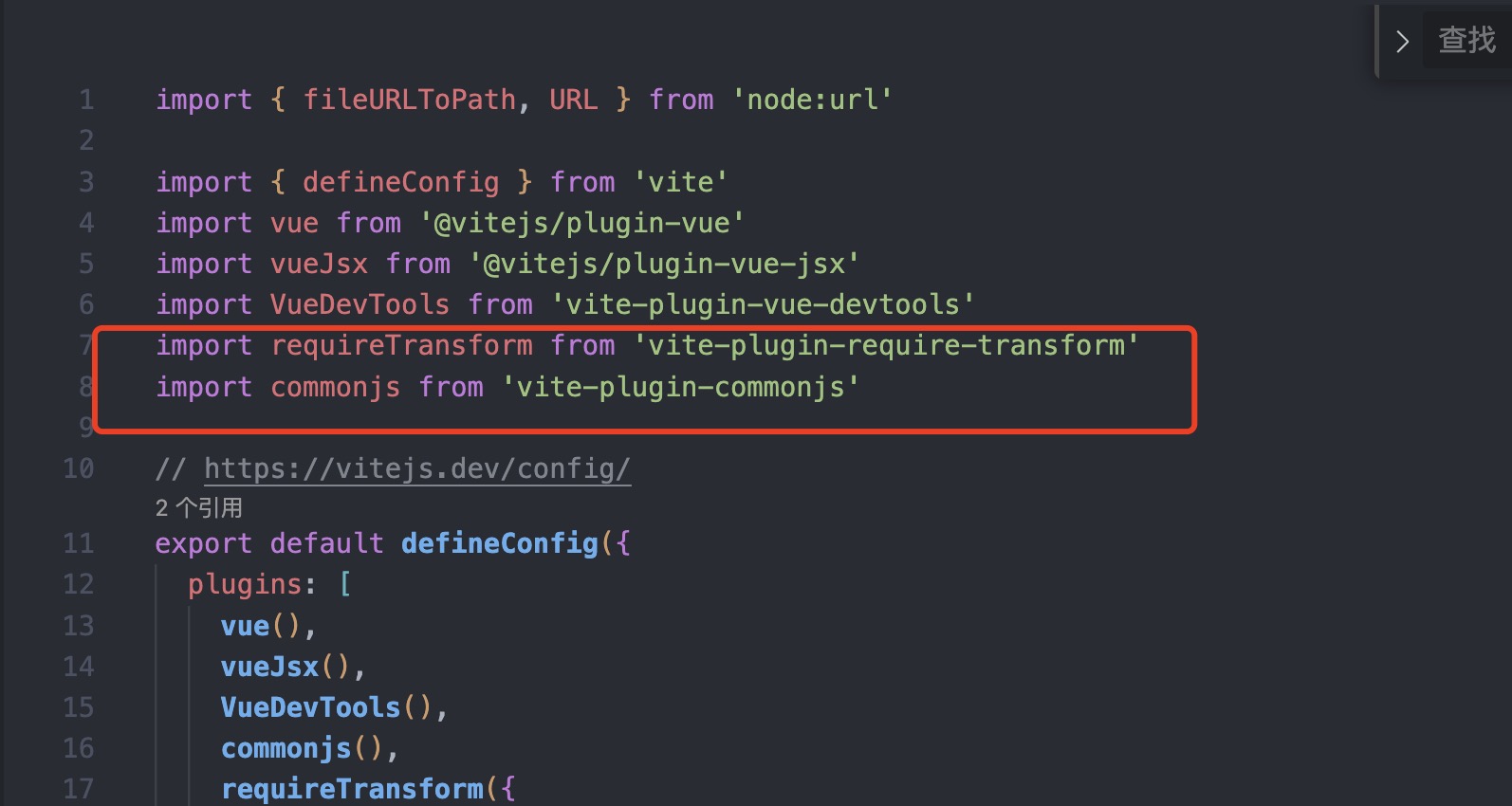
npm i -f3\. vue3適配問題
The requested module '/src/im/floo-3.0.0.js' does not provide an export named 'default'需要通過 yarn 安裝 vite-plugin-commonjs 和 vite-plugin-require-transform 兩個插件。